

IT for schools, colleges and education organisations
In education the year is fixed. Work happens in the holidays or it does not happen at all.
Logic Networks works with schools, colleges, training providers and other education organisations across London and the rest of the UK.
The constraints are particular. Two populations to keep apart, staff and students. A calendar with immovable dates. Budgets set annually and often spent in a rush. Statutory information that has to be published and kept current. And safeguarding duties that sit over everything.
We plan around the academic year rather than asking you to work around us.
The busiest technology week of the year is the week before term starts.
Everything that could have been done in July gets attempted in the last few days of August. Planning backwards from the first day of term is most of the job.
- Work scheduled into holidays, planned months ahead
- Staff and student environments kept properly separate
- Filtering and safeguarding treated as a duty, not a product
- Budgets planned across years rather than spent in a rush
What we do for education organisations
Four areas, all shaped by the calendar.
The first is the one that decides whether the others go smoothly, because a rollout in term time costs several times what the same work costs in August.
Work planned around the year
Done in the holidays, not in September.
Device rollouts, network work, migrations and replacements scheduled into the holidays, with the ordering done months in advance.
The critical dates are the first day of each term and the start of the new intake. Everything else is planned backwards from those two.
Staff and student environments
Two populations, properly separated.
Separate arrangements for staff and students, with the sharing rules, mail restrictions and permissions each group should have.
The new intake and the leaving year group are the two busiest account events of the year. We build them as a repeatable process rather than doing them by hand each August.
Safeguarding and protection
A duty, treated as one.
Filtering and monitoring appropriate to the age of your students, access to records limited by role, and a written account of who can reach what.
We handle the technical side. Where a decision belongs to your designated safeguarding lead or your governors, we say so and give them the information to decide with, rather than deciding for them.
Devices that survive students
Shared, reset and accounted for.
Shared devices built so they return to a known state, trolleys and suites managed as a group, and a record of what exists across every room.
Replacement is planned as a rolling programme rather than as one large year, which is both cheaper and far easier to get through a budget cycle.
Bromcom migration, data & BI
Get more from your move to Bromcom.
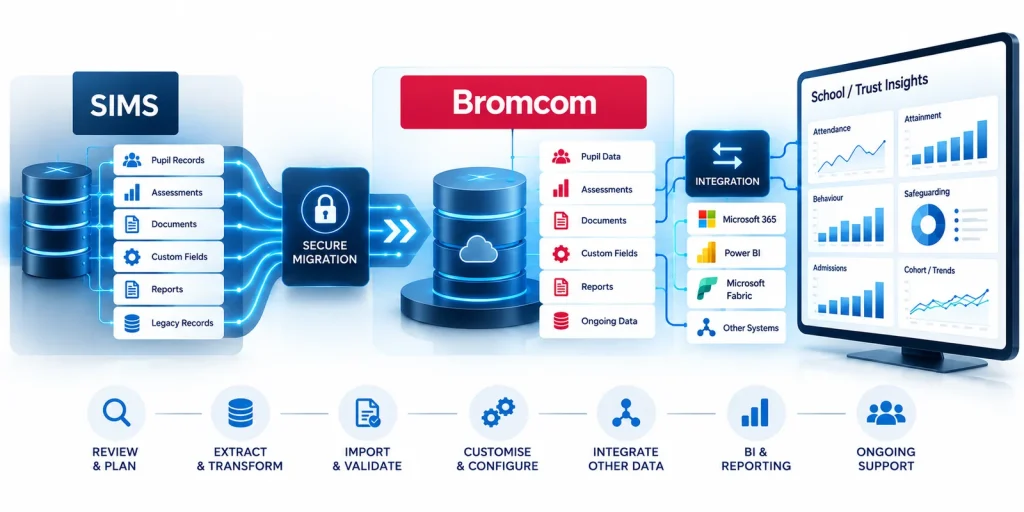
Moving from SIMS to Bromcom? Logic Networks can help schools and trusts manage the data that may need additional attention during migration, including historical assessments, documents, custom fields, reports and legacy records.
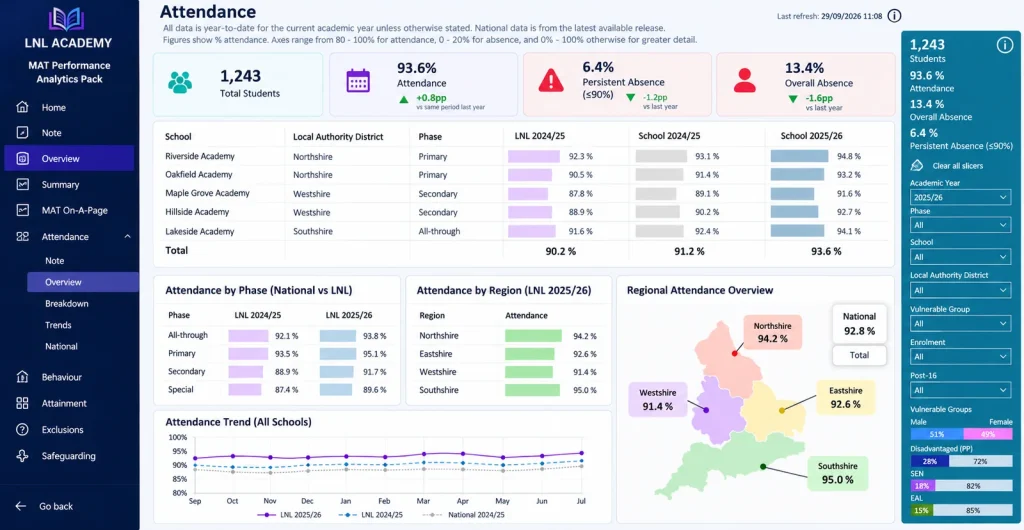
We can also support Bromcom customisation, data integration and Business Intelligence, using tools such as Power BI and Microsoft Fabric to transform MIS data into clearer reporting and actionable insight.
Inclusion Dashboard for schools and trusts
See the bigger picture. Support every learner.
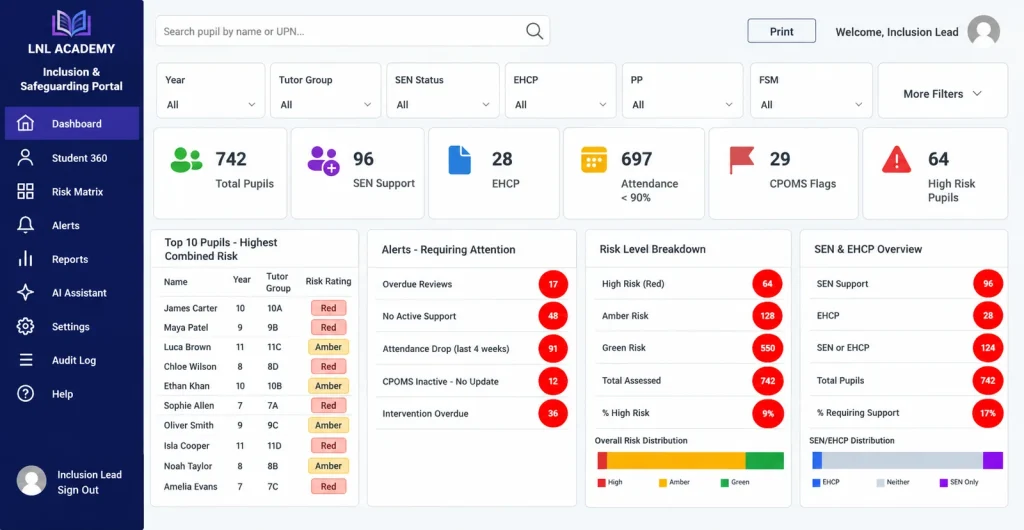
Bring important inclusion data together in one clear, accessible view. The Inclusion Dashboard helps schools and trusts understand trends across areas such as SEND, attendance, behaviour, safeguarding and pupil outcomes, reducing reliance on disconnected spreadsheets and reports.
By combining information from different systems, we can give school leaders and inclusion teams better visibility of their data, helping them identify trends, monitor interventions and make more informed decisions.
How education organisations work with us
Three arrangements, and the third is the most common in schools.
Most schools have somebody internal, often a network manager or a technician. The usual arrangement is not to replace them but to give them cover and somebody to check a design with.
Tell us what you have internally and we will say which of the three we would suggest.
-
A summer project
A defined piece of work delivered in a holiday. Ordered in spring, done in July or August, tested before term.
-
Full support
The whole environment run for you, for organisations with nobody internal. Fixed monthly cost based on users and devices.
-
Alongside your own technician
They keep the day to day. We cover the specialist work, the projects, the holidays and the second opinion on a design.
When education organisations call us
Usually in the spring, planning the summer. Sometimes in September, when something that should have been done in August was not.
If you are planning summer work, the useful time to talk is the previous term, because the ordering is what takes the time rather than the installation.
- Summer work needs planning and nobody has the capacity
- The network or the wireless cannot cope with the number of devices
- A technician is leaving and the knowledge is going with them
- An inspection or an audit has asked a technology question
- Equipment has reached the end of support and has to be replaced
- Two sites, or a federation, each doing things differently
What we need from you
Three things, and the first one is simply your calendar.
Everything in an education project is scheduled from the calendar. Giving it to us early is the single most useful thing you can do.
Your term dates and busy weeks
Including inspections, exam periods, open evenings and the weeks the building is unavailable. Work is planned around these rather than into them.
Someone who can approve
A business manager or senior leader who can sign off spending between governor meetings, even where the larger decision goes to them.
Access, including to the building
Administrator accounts, and who opens the school in the holidays. Summer work is frequently limited by site access rather than by the work itself.
What we usually find in an education organisation
These come up in most schools we review, and none of them reflects badly on the people who have been keeping things going.
- Wireless designed before every student carried a device
- Shared student accounts, so nobody can tell who did what
- Leaving year groups still holding active accounts
- Staff and student environments overlapping where they should not
- One technician holding all the knowledge and no documentation
- Equipment past its support date because replacement was deferred
- Filtering configured years ago and never reviewed against current needs
- Summer work attempted in the final week of August every year
Our steps for working together
Everything works backwards from the first day of term. These are the stages for a typical summer project.
- Spring conversation What needs doing in the holidays and what it depends on. Early enough to order.
- Survey and plan The rooms, the network, the devices and the site access, written up with a cost per item so parts can be deferred.
- Order in the spring term Equipment and any lines. This is the deadline that cannot be recovered later.
- Do the work in the holiday With a completion date at least a week before term, not on the last day.
- Test with staff before term An in service day if possible, so the first faults are found by three people rather than by four hundred.
- Handover and documentation Given to your own technician as well as to leadership, so the knowledge stays in the school.
Wireless in a school, and why it is different
School wireless fails in a way office wireless does not. An office has thirty devices spread through a building. A school has four hundred arriving in the same hall at the same minute, then all moving together to a different part of the site an hour later.
What breaks is rarely the signal. It is the number of devices asking to connect at once, and the way they all try to use the nearest access point rather than spreading across the ones available.
That means the design questions are different. How many devices in the busiest room, not how many in the building. Whether the access points can hand devices between each other as a class moves. Whether the connection out of the school can carry a whole year group streaming at once. And whether the guest network for visitors and parents is genuinely separated from the staff and student ones.
We survey with those questions rather than with a coverage map. In practice it usually means more access points in the halls and fewer in the corridors, which is the opposite of how most schools were originally cabled.
The new intake and the leaving year, as a process
- Accounts created from your student system Rather than typed in, which is where the errors come from.
- Group membership by year and class So permissions follow automatically when a student moves up.
- Leavers handled on a date Access ended, and any work they are entitled to keep made available to them first.
- Devices reset between years Returning to a known build rather than accumulating whatever last year’s class installed.
- The whole thing repeatable Written down, so it does not depend on one person remembering how August works.
What good looks like in a school
Summer work finished a week before term. The new intake has working accounts on day one. Wireless holds up in an assembly with every device connected. Your own technician has documentation and somebody to ask. Replacement is a rolling programme in the budget rather than a crisis. And nothing important depends on a single person’s memory.
Related services
Education work usually starts with the network or the devices, because those are what the calendar forces.
- Networks and infrastructure for wireless and cabling across a site
- Devices and endpoints for shared and staff equipment
- Microsoft 365 for staff and student accounts
- Cybersecurity for filtering, access and safeguarding support
- Projects for the work that has to happen in a holiday
Articles and news for education
Practical notes on summer planning, accounts and devices, written for business managers and technicians.
SharePoint or a mapped drive: choosing where files live
Neither option is the modern one and the old one. They are good at different things. Here are the questions that decide it.
Read the articlePlanning a hardware refresh over three years
Replacing everything at once is expensive and disruptive. A rolling three year plan spreads both, and the list is easier to build than it looks.
Read the articleWhat a monthly IT report should actually tell you
Ticket counts make a report look busy without saying whether anything improved. Here are the five things a monthly IT report should carry.
Read the articleTalk to us about your school or college
Tell us your term dates and what needs doing in the next holiday. We will survey it, cost each item separately and tell you what has to be ordered now rather than later.
If you are planning summer work, the time to talk is the spring term.